tags:

views:

70

answers:

4

1) I know there are lots of web sites that describe in what order events are called during the Asp.Net page life-cycle. But is there also a tool, perhaps Reflector, that would enable me to figure out by myself in what order are ALL the page’s events and their event handlers called during the page’s life cycle?

2) Would you say that trying to figure out exactly what is going on under the hood is a good idea or a waste of time? To clarify – I’d like to figure out exactly what is going on when a control tree is build – thus all the method calls, all the events called etc needed for control tree to be build ( I imagine there are hundreds or perhaps thousands lines of code written just for building a control tree).

thanx
+6  A: 

ASP.net Tracing would be the one I'd go for. It'll show you when each method in your page/control is called and you can also output additional data to the trace as well. It's primarily intended (I guess!) as a debugging tool, but I think it'll be more than adequate to show you the exact lifecycle a page is undertaking.

To turn on tracing, add the following to your web.config file:

 <trace enabled="true" pageOutput="true" requestLimit="10" traceMode="SortByTime" localOnly="true" />

As Jim Schubert pointed out in a comment, you can also modify the @page directive of a specific page to enable tracing:

 <%@ Page Title="" Trace="true"......

You can then access the trace details by navigating to "Trace.axd". If you're using a remote server (i.e. not Cassini or IIS on localhost) then change the localonly="true" to localonly="false" in the snippet above.

Having an understanding of what goes on under the hood in WebForms can be very useful, it certainly makes solving some of the oddities and edge-cases a lot easier.

Rob
You can do this on a per-page basis by adding to the aspx web form's Page directive: Trace="True". e.g. `<%@ Page Title="" Trace="true" ...`
Jim Schubert
@Jim Schubert, good point! +1 :)
Rob
Why doesn't Tracing show events fired prior to PreInit? How then can I figure out which method or event ( one that actually triggers the building of a controls tree ) is called by Asp.Net?
AspOnMyNet
@AspOnMyNet, I *think* PreInit is the first page event, hence there beng nothing shown prior to that? I'm not quite sure what you mean by the second part of your comment, perhaps if you give an example, or rephrase it? :)
Rob
@Rob: look here http://msdn.microsoft.com/en-us/library/ms178472.aspx
ram
@Ram, I already have done, and I was correct, PreInit is the first page level event. I'm really not quite sure why you've directed me to that page :)
Rob
Sometime during page life-cycle the control tree is build and controls are added to it. The actual code that builds this control tree is contained in some method. I'd like to know the name of this method, when this method is called and what calls it ( by what calls it I'm asking whether a code in Page class's constructor makes a call to this method, or... )
AspOnMyNet
@AspOnMyNet, The ASP.net engine (a simplification lies ahead) takes care of this by recursively calling CreateChildControls, starting at the page and working its way down. (http://msdn.microsoft.com/en-us/library/system.web.ui.control.createchildcontrols.aspx)
Rob
Is there a way to figure out what methods (and in what order) Asp.Net engine calls during page's life cycle?
AspOnMyNet
@AspOnMyNet, I refer you to the link at the start of my answer, specifically the part under the section "Writing to the Trace". If you put a Trace.Write("Some text here") call at the top of each method you're interested in, the trace will show you when in the lifecycle that Trace.Write was.
Rob
Problem is that I don't know what methods are called by Asp.Net engine, so I don't know what methods I'm interested in ( BTW - I did override Page.GetChildControls and put Trace.Write("tralala") in it, but Trace didn't show anything :( )
AspOnMyNet
@AspOnMyNet - I really think you need to ask another question on here that contains the meat of the question you're actually trying to find the answer to, rather than the semi-abstract question that you've asked, as I'm about ready to give up on this back and forth due to sheer exhaustion! :)
Rob
I apologize about my questions being too vague. I really don't know how to make them any more specific than they are. Anyways, thank you for your time and help
AspOnMyNet
+2  A: 

Enabling trace might help you to understand the page life cycle. You'll see the page events that's called while ASP.NET renders the page.

Try simply this, and take a look at your page's bottom :

<%@ Page Language="C#" Trace="true"  %>
Canavar
+1  A: 

IMHO, you should understand what is happening in the page lifecycle, to develop a decent application. Knowing only helps, can't hurt. And once you understand, you can design hi-performing applications (knowing that not all modules are needed for your application). See this - for asp.net performance tuning.

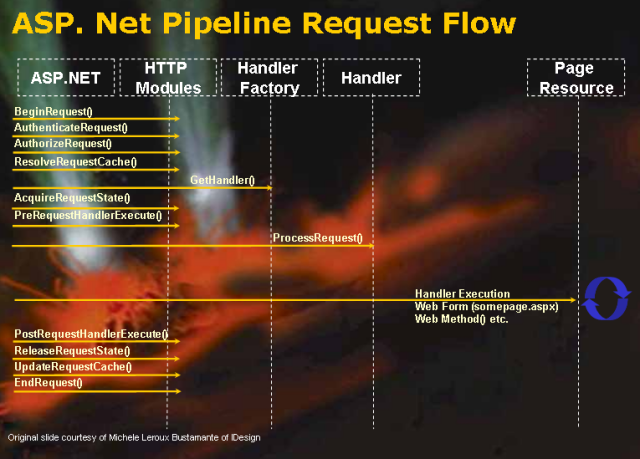
Here is a good low level explanation from Rikh Strahl. Look at this diagram, you can understand them better.

ram
+1  A: 

1) Put a breakpoint in the constructor of the page, then step through the code (F10) to see in which order your code runs. Alternatively, put breakpoints in all events and see in which order they are hit.

2) The definition of time waste depends on what time you are spending and why you would need the information. Generally you should not dig much deeper than what you need for completing the task at hand. The platform is designed so that you don't have to know much at all about what's happening behind the scene to use it.

If it's just for curiosity, then you just have to decide how much of your time you want to waste on it.

Guffa
I've created an empty constructor in code-behind,put a breakpoint in it and step through it, but after two steps ( thus after pressing F10 twice, the page was already loaded )
AspOnMyNet
You have to have some events in the page to see how they are called. Put some handlers like Page_PreInit, Page_Init, Page_Load and Page_PreRender in it, and put some controls in the page and hook up some of their events.
Guffa