In my Asp.Net 4.0 C# application I wanted to use chart control. Is there any chart control designed to work with asp.net 4.0 where my application is going to be deployed with the Azure Frame work. Suggest me with any informative links to move forward
+1
A:
Seems like your question already contained the answer :)
.NET 4 come with a large set of their own charting controls. Scott Guthrie has a post about it and also provides multiple links with examples how to use them from 4 Guys from Rolla
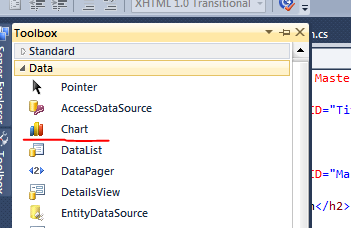
UPD: Just to confirm that the charting control is in fact present in VS2010 - here's a screenshot of the control in the Toolbox:
Artiom Chilaru
2010-04-20 05:40:25
Hi Artiom,I didnt see any chart control for the asp.net in the toolbox. Please make it more clear for me
stackuser1
2010-04-20 05:50:54
You are using VS2010, right? If you're still using VS2008 then you have to download the charting control, but you can't use .NET 4 in it anyway.. If you're using 2010 then just head over to the Data tab if you're in design view in a ASP.NET page, or just add an asp:Chart control to your page! I Have just tested it and it's there!
Artiom Chilaru
2010-04-20 05:59:58
Thanks for your response. I got it now. Previously my application is pointing to .Net 3.5 FW version.
stackuser1
2010-04-20 06:14:47
Cool.. could you accept the answer then? :P
Artiom Chilaru
2010-04-20 06:46:39
.0 where my application is going to be deployed with the Azure Frame work. Suggest me with any informative links to move forward
stackuser1
2010-05-18 09:43:22
You should ask a new question for this not extend the current one
Mark
2010-05-18 09:48:07
What @Mark said :PThis is a completely different and unrelated question you're asking...
Artiom Chilaru
2010-05-18 09:54:27
A:
Whilst frameworks can add a little processing overhead to your requests issues are more likely to be elsewhere such as at the database layer. Ensure that you do caching of results, offload long-running processes to queues and you should be fine.
stackuser1
2010-06-08 12:14:25