Check if this is a MANFEST.MF generation issue (see this thread)
Open the MANIFEST.MF of the base project and look at the Runtime tab.
The packages that are to be accessed in other plugins should be listed as Exported Packages.
Try to re-compute the right list of exported packages.
If this is not working, as described in this thread, you still have the option to de-activate the warning:
- Windows -> Preferences -> Java -> Compiler -> Errors/Warnings
- (or: Project) Properties -> Java Compiler -> Errors/Warnings
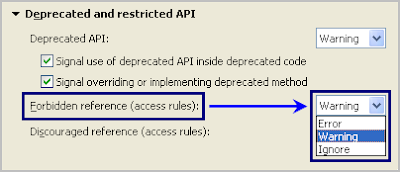
"Warning" or "Ignore" options will only hide the potential issue in the project, by allowing the project to use any classes ignoring predefined access rules.
To completely resolve this issue, analyze the project and located the use of restricted classes and take necessary actions (either remove those references or access rules).
For external jar (not your case), Potential workaround:
If I add the Jar file as an external jar and move it up before the JRE system Library (in order of export), I don't get this error.
Actually the OP slowik managed to avoid the dependency by accessing the Workbench services through the PlatformUI
PlatformUI.getWorkbench()
instead of Workbench.getInstance()
You can see this approach used in the rcp.util.RCPUtil class:
/**
 * Returns wether the ViewPart with the given id is currently visble in
 * one of the pages of the active Workbench window. Will also return
 * true when the page-book containing this view is minimized.
 *
 * @param viewID The id of the view to be queried
 * @return Wether the view is visible
 */
 public static boolean isViewVisible(String JavaDoc viewID) {
   // IWorkbenchPage[] pages = Workbench.getInstance().getActiveWorkbenchWindow().getPages();
   IWorkbenchPage[] pages = PlatformUI.getWorkbench().getActiveWorkbenchWindow().getPages();
   for (int i = 0; i < pages.length; i++) {
     IWorkbenchPart part = pages[i].findView(viewID);
     if (part != null) {
       return isPartVisible(part);
     }
   }
   return false;
 }