views:

25

answers:

1

Is it possible to create a Custom Control which inherits from System.Web.UI.WebControls.Login and change its layout and add additional controls such as a DropDownList. I have tried various ways to do this by overriding the Render Contents methods but each time I have to recreate the controls which are already present in the main Login control. Is it possible to somehow get a reference to the controls in the parent class and then override the Render Contents method to render the controls how I need them?

I would like if at all possible to use the controls and functionality that already exist in the Login control but just change the layout and add in an additional DropDownList control.
+2  A: 

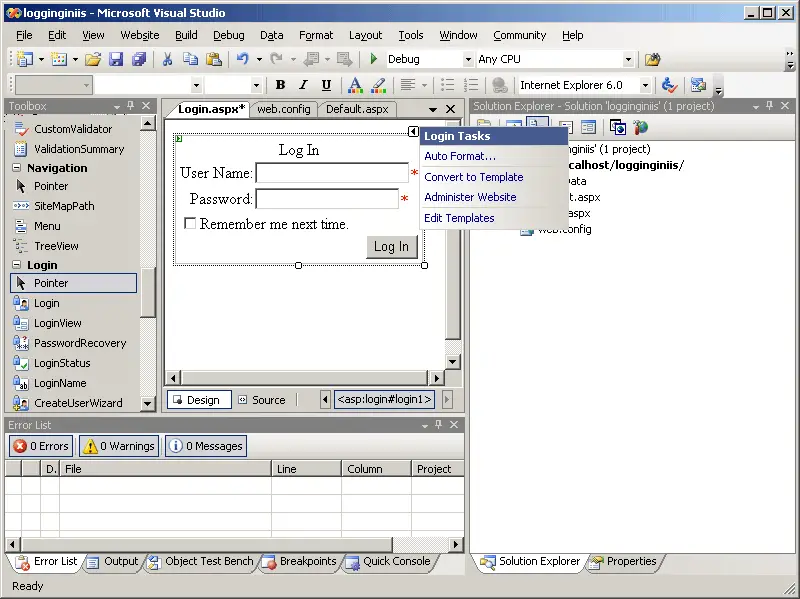
Right way to do this would be to convert it to template and modify as you need. We don't use inbuilt Login Control, we use plain textboxes and perform authentication using code.

Click on CONVERT TO TEMPLATE option on Login Control SmartTag to convert it into editable template.

alt text

this. __curious_geek
I did look at creating a Template class that implements ITemplate but does that mean I have to code the login functionality by hand i.e. all the required field validators etc? http://msdn.microsoft.com/en-us/library/system.web.ui.webcontrols.login.aspxThis all has to be done in a Custom Control not in the UI of the Login.aspx page
Cragly
I don't recommend writing a custom control altogether just for the sake of adding a DropDown, If I could get you correctly. Just drag-n-drop the Login control on your web page as mentioned in the pic and convert it to template.
this. __curious_geek
Thanks for the great response. However this control is going to do much more than have an additional DropDownList. It is going to authenticate a user against multiple data sources and its needed on multiple projects, hence the creation of a control. I did not explain this in the original question as wanted to keep the question as simple but as specific as I could.
Cragly
I'd still recommend not write a server-control for this. It'd be an overkill writing a server control for what you need. You can write a UserControl(ascx) in this case.
this. __curious_geek